
Shipping
Multi-carrier shipping software for retail counters
USPS, UPS and FedEx side by side on every parcel, with your markups applied before the customer sees a price.
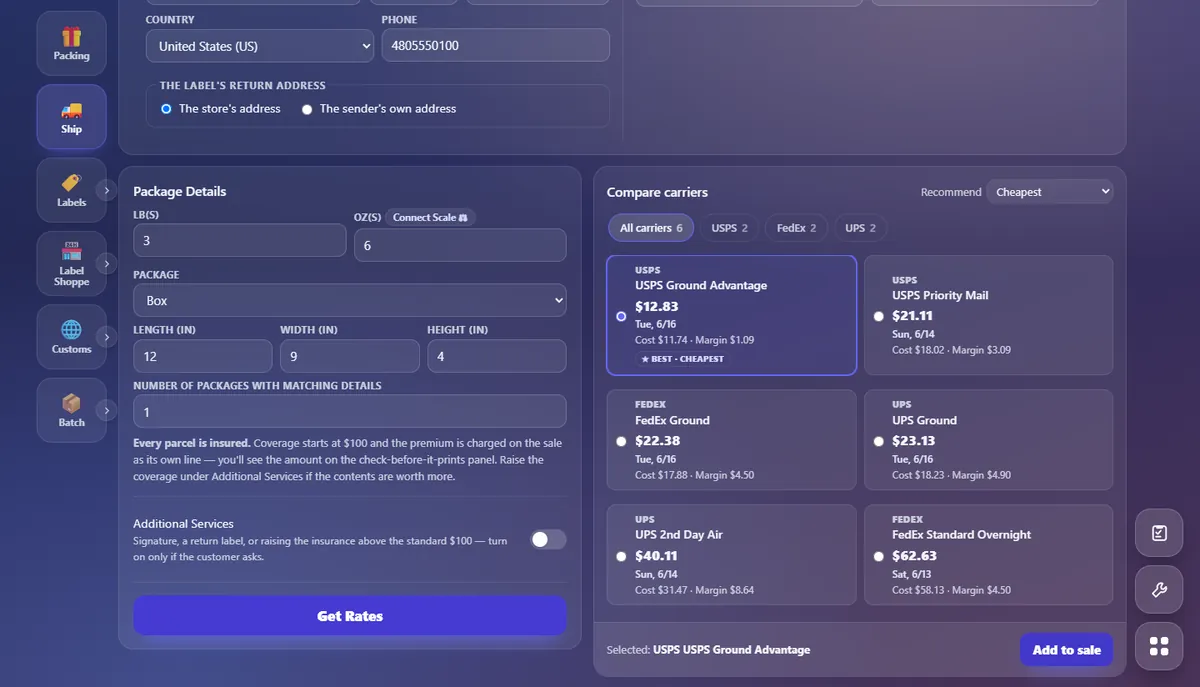
Rate once, see all three
Enter the two addresses and the parcel, and the counter compares the USPS, UPS and FedEx services that fit, cheapest first. Each rate shows what it costs the store and the margin on it, so staff sell the right service without doing the arithmetic.
What shipping includes on the free plan
- USPS, UPS and FedEx rating
- Label printing and voids
- Per-service markups
- Packaging and extra services
- Insurance and claims
- Return labels
- Pickups and manifests
Carrier accounts
You do not need your own. USPS labels are always bought on Pack and Kin Studio’s USPS account. For UPS and FedEx you can link your own account so your negotiated rates are the ones shopped; that is a metered add-on, shown on pricing.
The label lands on the same ticket as the box and the packing at the register. Opening a new store? Read how independent stores get carrier access.
Questions
What store owners ask first
Can I use my own UPS or FedEx account?
How do I pay for shipping labels?
Which carriers can I ship with?
Is it really free?
How do I get started?
The rest of the counter
The register, the three carriers, mailboxes and the books share one set of records on the free plan; kiosks are an add-on.